Free Offline Subtitle (.srt) Generator for Windows
Drop in an audio or video file, get an .srt subtitle file back. It all runs on your own PC with Whisper, so nothing is uploaded and there are no per-minute fees.
Free & open source (MIT) · Windows 10/11 · works offline after the first model download
How to make subtitles from a video or audio file
- Install VoxScribe and let it download the speech model on first launch (internet needed once)
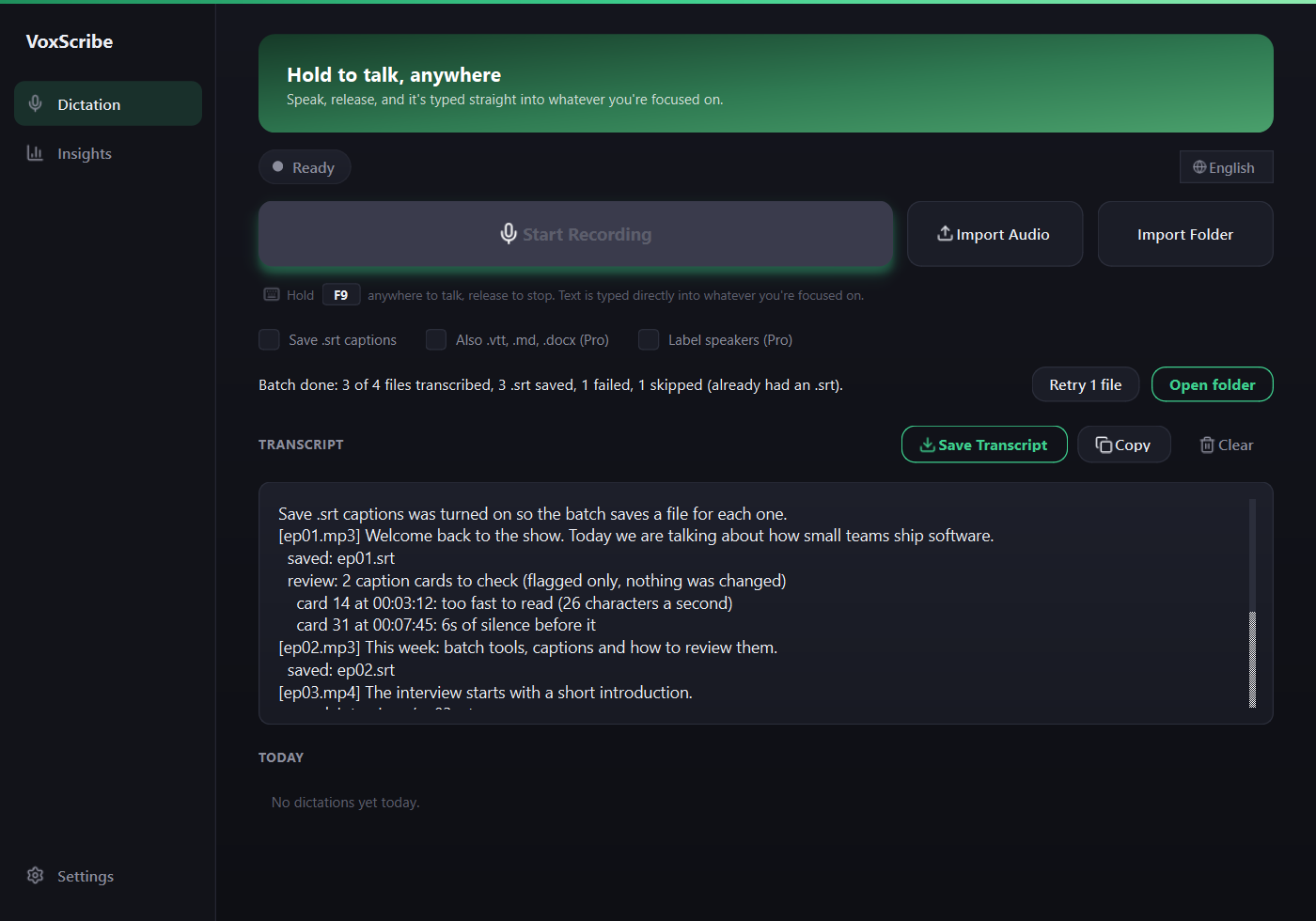
- Tick Also save .srt captions when importing a file under the Import Audio button
- Click Import Audio and pick your file, or pick several
- Wait for it to finish. The transcript appears in the app, and an .srt file with the same name is saved right next to your original file
Open the .srt in any video editor or player, such as VLC, DaVinci Resolve, Premiere Pro or CapCut, or upload it as a caption track on YouTube.
What the output looks like
A standard SubRip file: numbered lines, start and end times, then the text.
1
00:00:00,000 --> 00:00:04,000
This is a test of importing audio.

2
00:00:04,500 --> 00:00:08,200
Each line covers one spoken segment.
Why use a local tool for subtitles
- Private. Interviews, meetings and client footage never leave your computer.
- No limits or bills. No upload caps, no minute counters, no subscription. The app is free and open source.
- Batch friendly. Select a whole folder's worth of files and let it run through them.
- Many formats. wav, mp3, m4a, mp4, mov, flac, ogg, wma, aac and webm.
- Many languages. About 28 languages, or auto-detect. Turn on Translate to English to get English subtitles from other languages.
Captions that follow the voice
Each caption card holds at most two short lines of about 42 characters, so it stays readable on a phone. Cards are timed from the word timestamps and cut at pauses, so a card appears when the voice resumes after a silence, not on an even split of the clip. On a 47 second labeled test clip the worst card start was 1.3 seconds from the voice, against 8.2 seconds with an even split. That clip is synthesized speech on one machine, so real recordings will vary.
VoxScribe never overwrites an existing .srt, .vtt, .md or .docx file next to your audio. A folder run ends with a report of what was saved, skipped and failed, with a one click retry for the failures, and any card that stays on screen too long or follows a long silence is flagged for you to check. Nothing is changed behind your back. Folder import is free for two runs, then it is a Pro feature.
Frequently asked questions
Is my video or audio uploaded anywhere?
No. VoxScribe transcribes the file on your own PC with the Whisper model, so the audio never leaves your machine. The only internet use is a one-time download of the speech model on first launch.
Which file types can I turn into subtitles?
Common audio and video formats work, including wav, mp3, m4a, mp4, mov, flac, ogg, wma, aac and webm. Anything the bundled ffmpeg-based decoder understands should load.
Can I generate subtitles for several files at once?
Yes. Select multiple files in the import dialog and VoxScribe works through them one after another. With the .srt checkbox ticked, it saves a matching .srt next to each source file.
Can it translate subtitles to English?
Yes. Turn on Translate to English in Settings and speech in other languages comes out as English text. It only translates into English.
How accurate are the timestamps?
Timestamps come from Whisper's own speech segments, so each subtitle line covers one spoken segment rather than single words. That works well for captions, but you may want to review long lines before publishing.
Related guides: Free Voice Dictation Guide, Dictate Into Any App Guide, Android Voice Typing.
Home · Android · GitHub · Privacy · This site uses Google Analytics, see the privacy policy.